Featured image of post [golang] 카카오 로그인 연동 (OAuth2)

[golang] 카카오 로그인 연동 (OAuth2)

Golang으로 구현한 OAuth2 인증을 통한 카카오 로그인 기능 예제입니다.
Go 공식 서드파티 OAuth2 라이브러리를 이용하여 구현하였습니다.
https://pkg.go.dev/golang.org/x/oauth2

OAuth 인증 과정

  1. 클라이언트에서 백엔드로 OAuth 로그인 API 호출
  2. 백엔드에서 클라이언트를 해당 로그인 페이지로 리다이렉트
  3. 로그인 완료시 클라이언트에서 콜백 API로 인증 Code 전달
  4. 백엔드에서 Code 를 통해 인증 서버에서 접속 토큰 획득
  5. 획득한 접속 토큰으로 리소스 서버에서 사용자 정보 획득

카카오 인증 구현

로그인 페이지 (1)

1
2
3
4
5
6
7
8
9
<!DOCTYPE html>
<html>
  <head>
    <title>oauth2 login</title>
  </head>
  <body>
    <a href="http://localhost:8080/oauth/kakao">카카오 login</a>
  </body>
</html>

백엔드에서 클라이언트를 해당 로그인 페이지로 리다이렉트 (2)

 1
 2
 3
 4
 5
 6
 7
 8
 9
10
11
12
13
14
15
16
17
18
19
20
21
22
23
24
25
26
27
28
29
30
31
32
33
34
35
36
37
38
func RandString(n int) (string, error) {
	b := make([]byte, n)
	_, err := rand.Read(b)
	if err != nil {
		return "", err
	}

	return base64.StdEncoding.EncodeToString(b), nil
}

state := "state-code"
conf := &oauth2.Config{
    ClientID:     os.Getenv("KAKAO_CLIENT_ID"),
    ClientSecret: os.Getenv("KAKAO_CLIENT_SECRET"),
    Endpoint: oauth2.Endpoint{
        AuthURL:  "https://kauth.kakao.com/oauth/authorize",
        TokenURL: "https://kauth.kakao.com/oauth/token",
    },
    RedirectURL: "http://localhost:8080/oauth/kakao/callback",
}

r.GET("/oauth/kakao", func(c *gin.Context) {
	// 검증에 사용할 state값 생성
	state, err := RandString(32)
	if err != nil {
		c.JSON(http.StatusForbidden, gin.H{
			"message": err.Error(),
		})
	}

	// state 값 세션에 저장
	session := sessions.Default(c)
	session.Set("oauth2-state", state)
	session.Save()

	url := conf.AuthCodeURL(state)
	c.Redirect(http.StatusFound, url)
})

콜백API: 전달받은 코드를 통해 사용자 정보 획득 (4, 5)

 1
 2
 3
 4
 5
 6
 7
 8
 9
10
11
12
13
14
15
16
17
18
19
20
21
22
23
24
25
26
27
28
29
30
31
32
33
34
35
36
37
38
39
40
41
42
43
44
45
46
47
48
49
50
51
52
53
54
55
56
57
58
59
60
r.GET("/oauth/kakao/callback", func(c *gin.Context) {
	// sessions 에 저장한 state 값 검증
	session := sessions.Default(c)
	state := c.Query("state")
	if session.Get("oauth2-state") != state {
		c.JSON(http.StatusForbidden, gin.H{
			"message": "state code error",
		})
	}
	session.Clear()
	session.Save()


	// 코드를 통해 인증 서버에서 토큰 획득
	code := c.Query("code")
	token, err := conf.Exchange(c, code)
	if err != nil {
		c.JSON(http.StatusForbidden, gin.H{
			"message": err.Error(),
		})
	}

	// 토큰을 통해 리소스 서버에서 사용자 정보 획득
	req, err := http.NewRequest("GET", "https://kapi.kakao.com/v2/user/me", nil)
	if err != nil {
		c.JSON(http.StatusForbidden, gin.H{
			"message": err.Error(),
		})
	}

	req.Header.Add("Authorization", "Bearer "+token.AccessToken)

	client := &http.Client{}
	res, err := client.Do(req)
	if err != nil {
		c.JSON(http.StatusForbidden, gin.H{
			"message": err.Error(),
		})
	}
	defer res.Body.Close()

	bytes, err := ioutil.ReadAll(res.Body)
	if err != nil {
		c.JSON(http.StatusForbidden, gin.H{
			"message": err.Error(),
		})
	}

	var memberInfo KakaoMemberResponse
	if err := json.Unmarshal(bytes, &memberInfo); err != nil {
		c.JSON(http.StatusForbidden, gin.H{
			"message": err.Error(),
		})
	}

	// do stuff with memberInfo and get token
	fmt.Println(memberInfo)
	c.SetCookie("token", "tokenLikeString", 3000, "/", "localhost:8080", true, false)
	c.Redirect(http.StatusFound, "/success")
})

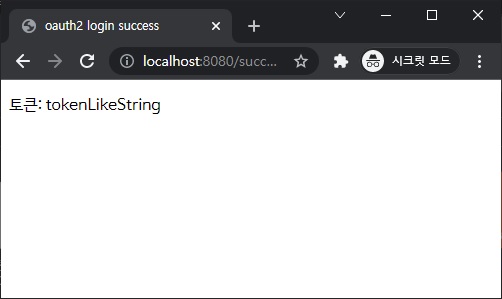
로그인 결과 페이지

 1
 2
 3
 4
 5
 6
 7
 8
 9
10
11
12
13
14
15
16
17
18
19
20
21
22
23
24
25
26
27
28
29
30
31
32
<!DOCTYPE html>
<html>
  <head>
    <title>oauth2 login success</title>
  </head>
  <body>
    <div>
      <p id="token"></p>
    </div>
  </body>
  <script>
    function getCookie(cookieName) {
      var cookieValue = null;
      if (document.cookie) {
        var array = document.cookie.split(escape(cookieName) + "=");
        if (array.length >= 2) {
          var arraySub = array[1].split(";");
          cookieValue = unescape(arraySub[0]);
        }
      }
      return cookieValue;
    }

    function setToken() {
      const token = getCookie("token");
      const el = document.getElementById("token");
      el.innerHTML = "토큰: " + token;
    }

    setToken();
  </script>
</html>

로그인 완료

결과 페이지

위 예제 코드는 공개되어있습니다.

Hugo로 만듦
JimmyStack 테마 사용 중